On Microservices (Chapter 4 - Query Services)
2 of 4 - Query Services
For reference, the 4 service types were:
- Noun
- Query
- Journal Reader
- Verb
This chapter will examine the second.
— Query Services —
Given the radical simplification of noun services, the obvious next type of service to discuss is the query service.
So, if all of the filtered GET logic has been unceremoniously ripped out of noun services, where does it go? Obviously, it is needed. And, I mentioned in the last chapter it was relocated.
The query service was the destination.
But, it didn’t just get relocated. It was also refactored into a completely different form - a better form. Change can be a good thing! So, don’t be like those Sweeney haters, all 12% of them.

Like Sweeney’s ad, this particular change hails back to the era of bell bottom jeans and relational database gateways. (Sorry, I couldn’t resist. I bet you didn’t expect to see Sweeney in a microservices write-up! LOL.)
The query service is a write-once-and-reuse service (or library) that can be instantiated as many times as are useful in (or across) orgs.
The realization reached by the journaled microservice architecture team was this:
— There is rarely a need for custom database query logic to live in app code, nor for it to be executed on the same servers servicing OLTP (Online Transaction Processing) traffic. This logic is a prime candidate to be relocated, standardized (read: written once), and driven via configured mappings. Savings all around!
At a high level, the query service is dead simple: It accepts HTTP GET calls in familiar URL form and replies with JSON results.
(NOTE: I refer to JSON throughout this writeup because of its current popularity. But the patterns discussed here work equally well with any other representation and serialization strategy.)
Let’s examine this in more detail to see what is going on ‘under the hood’.
A typical call to a query service might look like:
https://[hostname]/v1/queries/employees/getEmployeesByBranchId?branchId=4bcc85f2-8a2d-4a6b-be4f-b2293b4fd295
The corresponding HTTP response? A JSON array containing the employees referenced by the branchId. Something along these lines:
[
  {
    "id": "EMP001",
    "firstName": "John",
    "lastName": "Doe",
    "position": "Software Engineer",
    "department": "Engineering",
    "email": "john.doe@example.com"
  },
  {
    "id": "EMP002",
    "firstName": "Jane",
    "lastName": "Smith",
    "position": "Project Manager",
    "department": "Operations",
    "email": "jane.smith@example.com"
  },
  {
    "id": "EMP003",
    "firstName": "Peter",
    "lastName": "Jones",
    "position": "UX Designer",
    "department": "Design",
    "email": "peter.jones@example.com"
  }
]
Internal to the query service are:
-
a ‘canned’ (read: predefined) set of queries / stored-procs that are mapped to the API-exposed (ie. URL-form) queries
-
Generic logic to:
- Do plan creation (and parameter binding) on query service startup
- Llsten for incoming queries
- Query execution with URL-to-SQL parameter substitution (SQL-injection safe! Secured. Parameter counts and type validated
- Writing of responses with conversion of DB (database) results into JSON responses
- Monitor query execution times with appropriate logging/notifications for excessive execution times
Centralizing queries to a service of this nature has numerous attendant benefits:
-
HUGE time saved through the elimination of writing/maintaining custom DB code spanning many services
-
Provisioning for read workloads (no writes) can be quite beneficial.
- Query services can (sometimes even) be instantiated to read from DB replicas that have less load and which never interfere with OLTP traffic - like taking orders from customers.
-
Query Services can be leveraged in cloud or on-prem, etc. or to enable calls between.
-
Relocation of app queries to a common focal point (read: gateway) enables DB experts to review all queries for proper indexing/performance. NOTE: I’d recommend keeping the defined queries and URL-mappings in GitHub-managed files (versus putting them into a DB table). It is more secure and provides for both review and history/audit.
-
Provides a central, bird’s eye view of how data is being used by apps
-
Is typically simpler than GraphQL and often eliminates the need for GraphQL entirely
Adding new (query) functionality for filtered GETs to the query service can be as simple as:
Step 1 - Create the underlying query
- Create the query and/or stored proc that will be used to retrieve the data. Check plan generation details for it against a production-populated table (ie. a table with ‘real’ rows of content vs one mostly empty. Otherwise, the plan generated may surprise you!) Test run it to ensure it is safe/performant.
This is where to leverage your DB experts, if not for creation, then definitely for review.
Step 2 - Map the new, underlying query so it can be used
- Define a new query service exposed query mapping (URL-to-SQL) with any associated parameters that must be passed to execute it. This is typically done in a resource file that is part of a given query service’s project. I’ve also seen this broken into separate files - one for public queries and another for secured queries.
A simplistic mapping for the URL example above might look like this (please don’t use “select * ” in a real system - ha):
  {
    "enabled": true,
    "serviceName": “employees”,
    "methodName": "getEmployeesByBranchId",
    "query": "select * from Employees where branchId = {branchId}”,
    "queryParameters": [
      {
        "name": “branchId”,
        "type": "STRING"
      }
    ]
  },
For easy reference, here is the matching URL call that matches the mapping just defined (copied from above):
https://[hostname]/v1/queries/employees/getEmployeesByBranchId?branchId=4bcc85f2-8a2d-4a6b-be4f-b2293b4fd295
Such an entry simply serves to enable translation from an incoming URL to the underlying SQL call that will get executed. The “select” shown above could just as easily have been a call to a stored procedure defined in the relational DB.
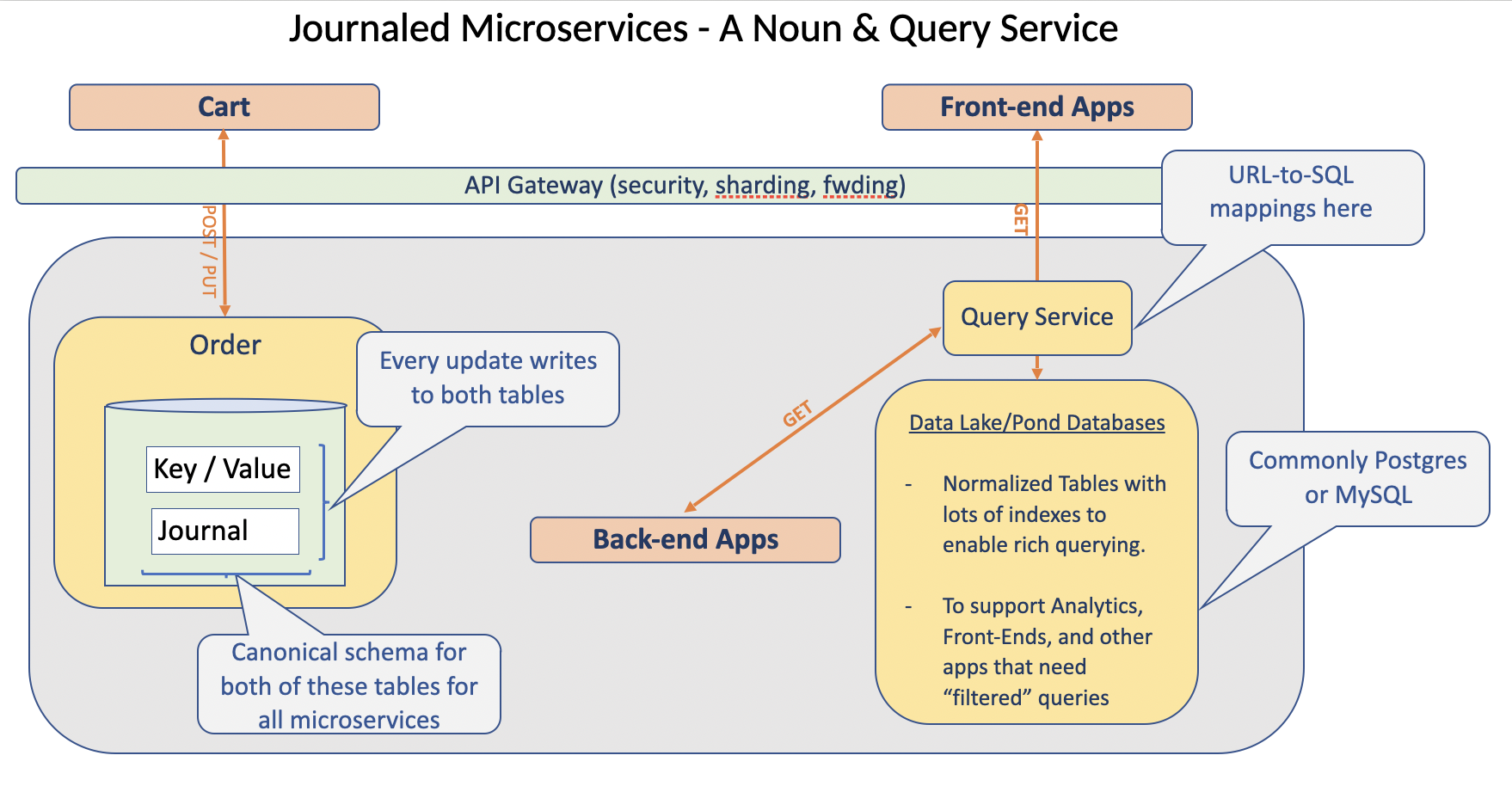
Summary:
The query service is a small, reusable piece of code that eliminates the need to write app-level DB code for retrieving app data. Leveraging the query service pattern enables building apps far more quickly - and makes them safer.
In my experience, building this service usually takes about 2 weeks, and then it is reused with minor changes only for the next several years spanning apps and teams. In my teams, it has also become a powerful tutorial for up-and-coming junior engineers seeking to understand the nuances of writing database code that is both fast and safe.
I’ve seen app code size reduced by > 50% using this pattern. Now multiply that by however many apps your org builds/maintains?
That is some serious ROI. When was the last time you had the opportunity to invest 2 weeks (heck, make it a month!) of one good developer’s time for such an enormous return on investment?
To quote that little goblin who hangs out in Booty Bay in World of Warcraft: “Time is money, friend!”

Our Next chapter explores the Journal Reader Service.